All guidesEvery day
Deadlines: the due list
"History essay, due Friday" is not a time on the clock. It is a deadline. Deadlines live in the due list, and you plan blocks of time to meet them.
Step 1: Open the due list
Tap ⚑ at the top of the screen. The number on it is how many things are still due.
Step 2: Add something that is due
Type what it is where it says What's due? Set the date beside Due and tap Add.
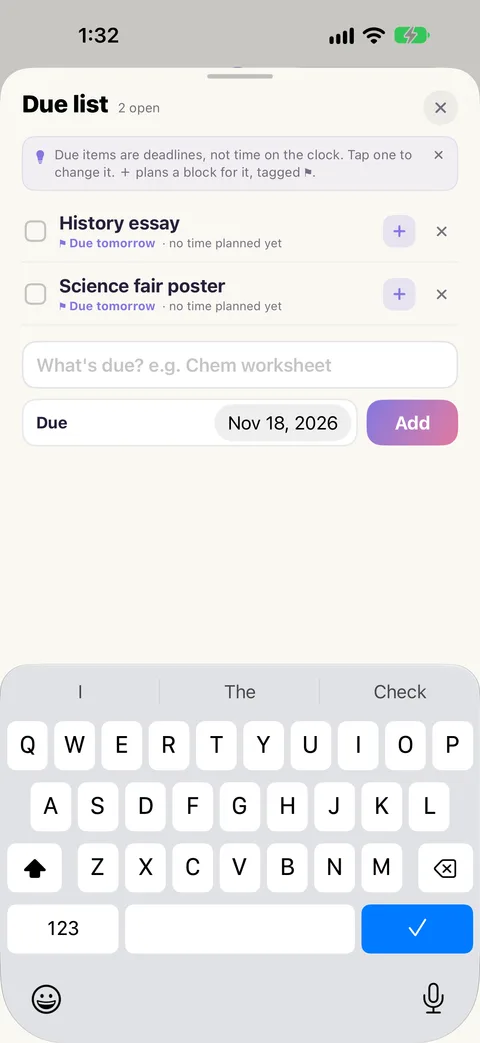
Step 3: Plan time for it
A deadline does not do itself. Tap the + on the item to plan a block for it. The New block form opens, already tied to that item. Choose when and tap Add to my day.
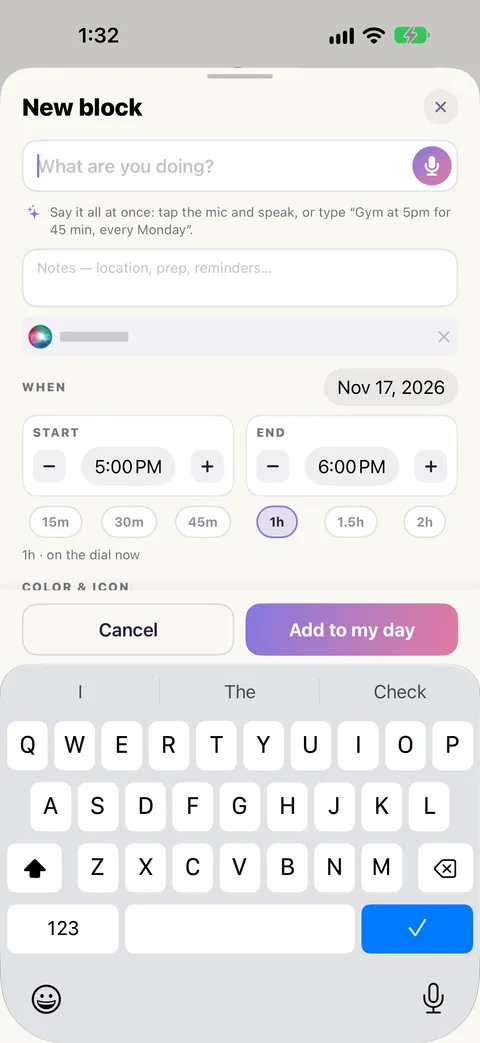
The block carries a small ⚑ so you know what it is for, and the item in the list shows that time has been planned. Plan as many blocks for one deadline as it needs.
Step 4: Change it
The date moved, or you spelled it wrong. Tap the item's words and it opens in place. Fix the name or the date and tap Save. Blocks already planned for it stay tied to it.
Step 5: Tick it off
Handed in? Tap the item's circle. To remove one, use its delete button.
Step 6: Get an alarm
With notifications on, your iPhone sounds an alarm on the morning something is due. See A heads-up before each block.